
Yes, this is absolutely doable! To display the GDPR-style opt-in banner for all visitors regardless of region, you simply need to configure the following in the Wizard (screenshot):
1. "Which region(s) do you target with your website?" — Select ONLY European Union (GDPR).
2. "Which banner do you want to display in other regions?" — Also select Europe (GDPR).
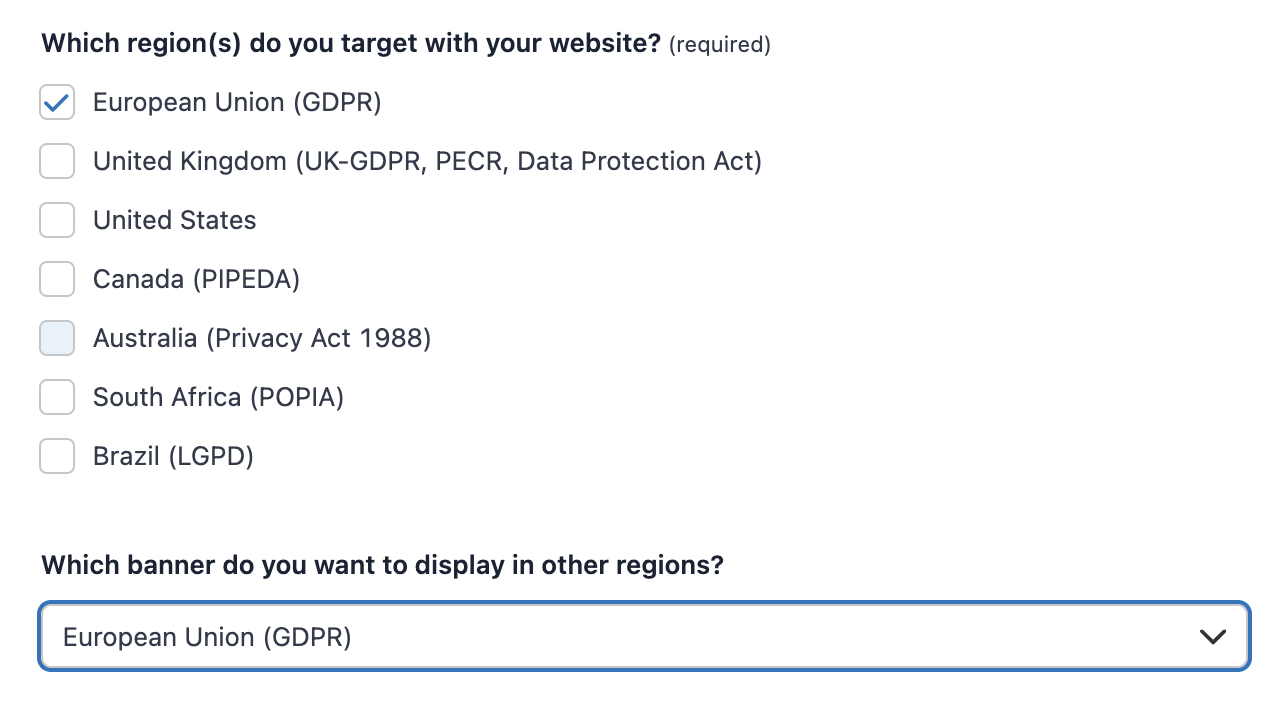
This will ensure the Accept / Deny / Preferences opt-in banner is served to all visitors, including those in the United States, without needing any custom code or mu-plugin workarounds.
IMPORTANT: If you do this and use Complianz to generate your legal documents, you will need to manually handle your US legal documents. You can generate them first while you set up the Wizard for the United States, then unsync them from Complianz (following this guide: https://complianz.io/editing-legal-documents/) and subsequently select only the European Union options in the Wizard.
1. "Which region(s) do you target with your website?" — Select ONLY European Union (GDPR).
2. "Which banner do you want to display in other regions?" — Also select Europe (GDPR).
IMPORTANT: If you do this and use Complianz to generate your legal documents, you will need to manually handle your US legal documents. You can generate them first while you set up the Wizard for the United States, then unsync them from Complianz (following this guide: https://complianz.io/editing-legal-documents/) and subsequently select only the European Union options in the Wizard.
I hope this helps!